Content Dev:CC Clothing Layer Guidelines
- Main article: CC Asset Development.
Cloth Layer Settings
There are no absolute or rigid rules for cloth layer settings. Layer values should be adjusted according to the specific characteristics of the asset and its spatial relationship (inner versus outer) relative to other garments.
Although newer versions of Character Creator allow users to manually adjust layer order within the application, content developers must assign a logical Factory Default layer setting during production. This establishes a reliable baseline layering hierarchy for end users.
Recommended Layering Principles
- Skin-tight / Inner Layers
 (for example: underwear, panties, lingerie)
 → Assign lower layer values, such as Layer 1.
- Outerwear
 (for example: coats, jackets, capes)
 → Assign higher layer values, such as Layer 10 or above.
Methods for Configuring Cloth Layer
1. During FBX Import
When importing a garment FBX file back into Character Creator, an import dialog will appear. The Cloth Layer value can be assigned directly within this dialog.
Please refer to: Content_Dev:CC_Import_Process
2. Via the Modify Panel
Select the garment, then navigate to Modify > Setting > Cloth Layer Settings. The Cloth Layer value can be adjusted directly within this panel.

Recommendation for Published Outfit Packs
Content developers are strongly encouraged to configure cloth layer settings for published outfit packs according to Character Creator’s official layer guidelines.
Doing so provides the following benefits:
Automatic Garment Replacement
When garments sharing the same cloth layer value are applied, the system prompts users to either:
- Replace the existing garment, or
- apply Material Only to the existing garment.

Logical Layering for Conformation
Character Creator’s Conform calculation (Run Collision) relies heavily on cloth layer values.
During the conform process, garments with a higher layer value are automatically superimposed over garments with a lower layer value, ensuring correct inner-to-outer layering behavior.

Collision Layer Assignments
Collision layer ordering is required for the correct sorting of garments when the Conform feature is performed.
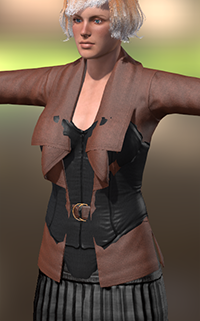 The tanktop underneath is set to a higher layer than the coat.
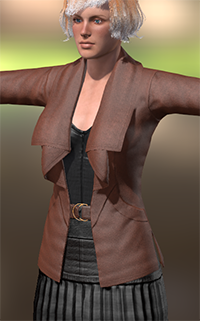 The coat and the tanktop are reordered for the right result.
- ⚠ A clash on same type clothing collision layer will result in the replacement of the previous garment.
CC supports upwards of 24 layers of clothing. Broadly speaking there are 3 main categories: Cloth, Gloves, and Shoes. Cloth has 3 subcategories: Upper Body, Lower Body, and Accessories. Collision layer assignment will not fix intersecting geometry at the default state. It does however, come into effect when calculating collisions with the Conform Clothing tool and upon loading. Use the type and layer table below for your reference:
Garment Type Total Layers Classification Lower Body (LOWER) 7 Cloth 2, 5, 8, 9, 11, 12, 14 Footwear (SHOES) 2 Shoes 1, 2 Upper Body (UPPER) 9 Cloth 1, 4, 7, 10, 13, 15, 18,19, 20 Extras (ACESSORY) 4 Cloth 3, 6, 16, 17 Handwear (GLOVES) 2 Gloves 1, 2
Layering of the garment is not an exact science as it depends largely on how it relates to the other layers surrounding it. Even though CC allows you to change the layer order on the fly, you will still need to set a default layer value for production as a factory preset. The following reference table demonstrates the relationship between the layers as well as the factory suggested presets:
Layer Purpose Category Intended Usage CC Default 1 1st layer of clothing Underwear, Shirt, Piecemeal For underwears, lingerie, leotards, swimsuit, and tights. Cloth 01 2 1st layer gloves Gloves Gloves that lay under the sleaves. Gloves 01 3 1st lower lower body Underwear, Pants, Skirt For undies, swimshorts, and leggings. Cloth 02 4 1st layer accessories Accessories and other items For socks, headband, and other personal accessories. Cloth 03 5 1st layer shoes Shoes For ordinary shoes. Shoes 01 6 2nd layer of clothing Shirt, Leotard For clothing that needs to be tucked into tight fitting pants or tight dresses. Cloth 04 7 2nd layer lower body Pants, skirt Tight fitting lower wear such as narrow skirts. Cloth 05 8 2nd layer accessories Accessories and other items Arm sleeves and other similar sized accessories. Cloth 06 9 3rd layer clothing Shirt, Piecemeal Garment that is layered under the tight fitting Cloth 5, also includes ordinary dresses. Cloth 07 10 3rd layer lower body Pants, Skirt For ordinary pants and skirts. Cloth 08 11 4th layer lower body Pants, Skirt For wider and losser pants or skirts. Cloth 09 12 2nd layer shoes Boots Boots and boots for bunched trousers Shoes 02 13 4th layer clothing Shirt, Piecemeal For looser, baggier clothing and dresses that touch the floor. Cloth 10 14 5th layer lower body Pants, Skirt For looser pants and skirts that lay on top of Coth 5. Cloth 11 15 6th layer lower body Placeholder Unassigned placeholder layer. Cloth 12 16 5th layer clothing Coat, Others Light, thin coats and vests. Cloth 13 17 7th layer lower body Placeholder Unassigned placeholder layer. Cloth 14 18 6th layer clothing Coat, Others Light, thin coats and vests. Cloth 15 19 2nd layer gloves Gloves Handwear that is layerd on top of the sleaves. Gloves 2 20 3rd layer accessory Accessories and other items For cloaks and clothing tied to the waist, etc. Cloth 16 21 4th layer accessory Accessories and other items Placeholder layer Cloth 17 22 7th layer clothing Coat For suits, coats, and jackets. Cloth 18 23 8th layer clothing Cloak For cloaks, smocks, gowns, overalls, and frocks. Cloth 19 24 9th layer clothing Placeholder Unassigned placeholder layer. Cloth 20
